If you maintain an open source project, you’ve probably wondered: who’s actually contributing? Are we retaining contributors or burning through a revolving door? Is one person carrying the whole project? These questions matter.
Commercial platforms answer these questions well. They do come with trade-offs though. Hosted analytics means sending your potentially private repo contributor data to a third party. Pricing models often assume enterprise budgets. And for a maintainer running a project with a handful of repos and no funding, the friction of setting up yet another SaaS integration is enough to never bother.
DevPulse takes a different approach. It’s a single binary that imports GitHub data into a embedded database and serves a browser-based dashboard from your machine. No dependencies, no cloud account, no subscriptions. Your data stays on your machine.
DevPulse supports external DBs like PostgreSQL so when the time comes, migration is easy. See Scaling Up section below for details.
What you get
DevPulse organizes project insights into six areas, each mapped to a dashboard tab:
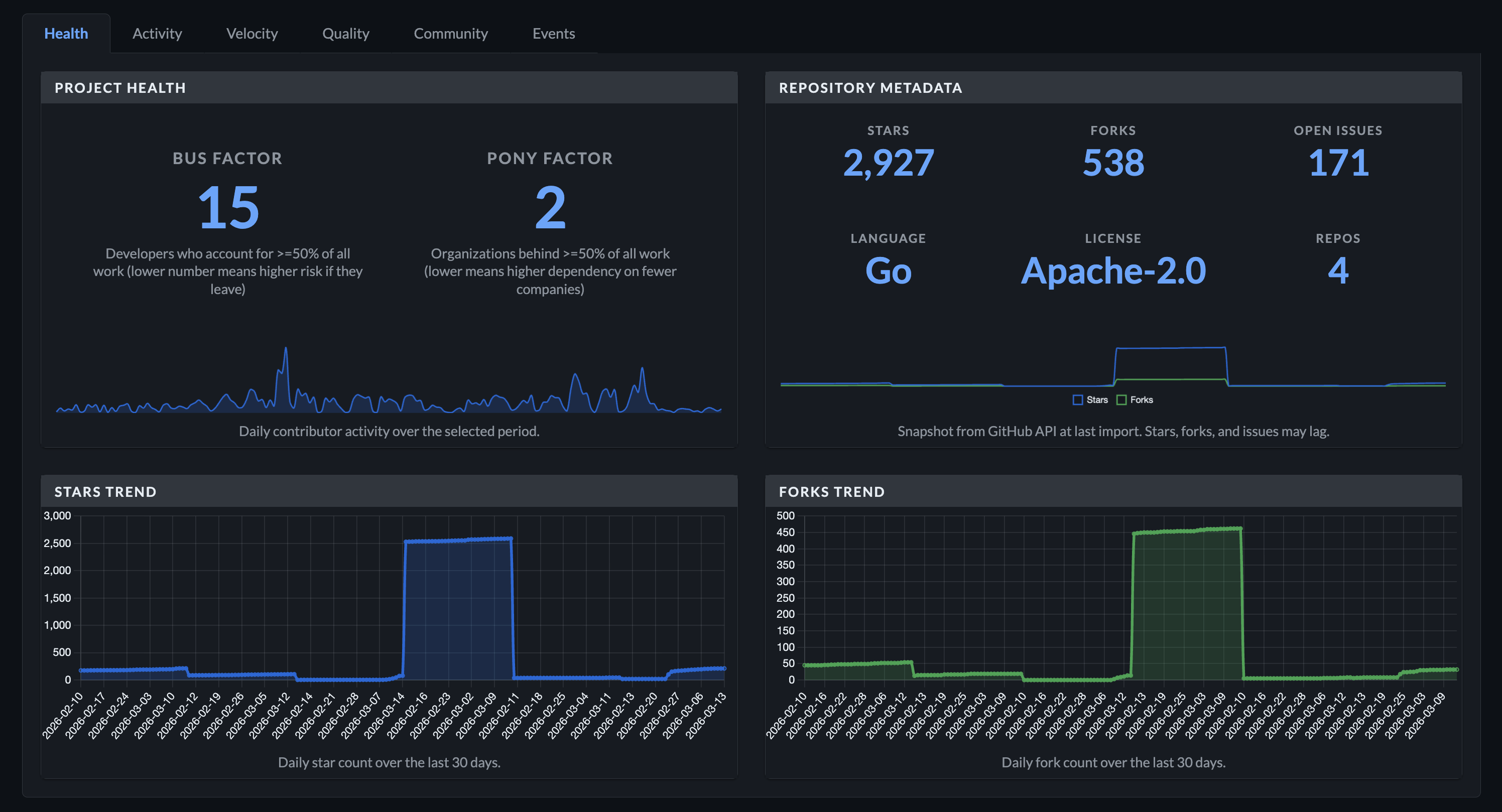
Health — Bus factor and pony factor tell you how concentrated your project risk is. Bus factor counts the minimum number of developers producing half your contributions. Pony factor does the same for organizations. A bus factor of one means your project has a single point of failure.
Activity — Monthly event volume broken down by type: pull requests, reviews, issues, comments, forks. A trend line shows whether activity is growing or declining. PR size distribution reveals whether your project culture favors small, reviewable changes or massive drops.
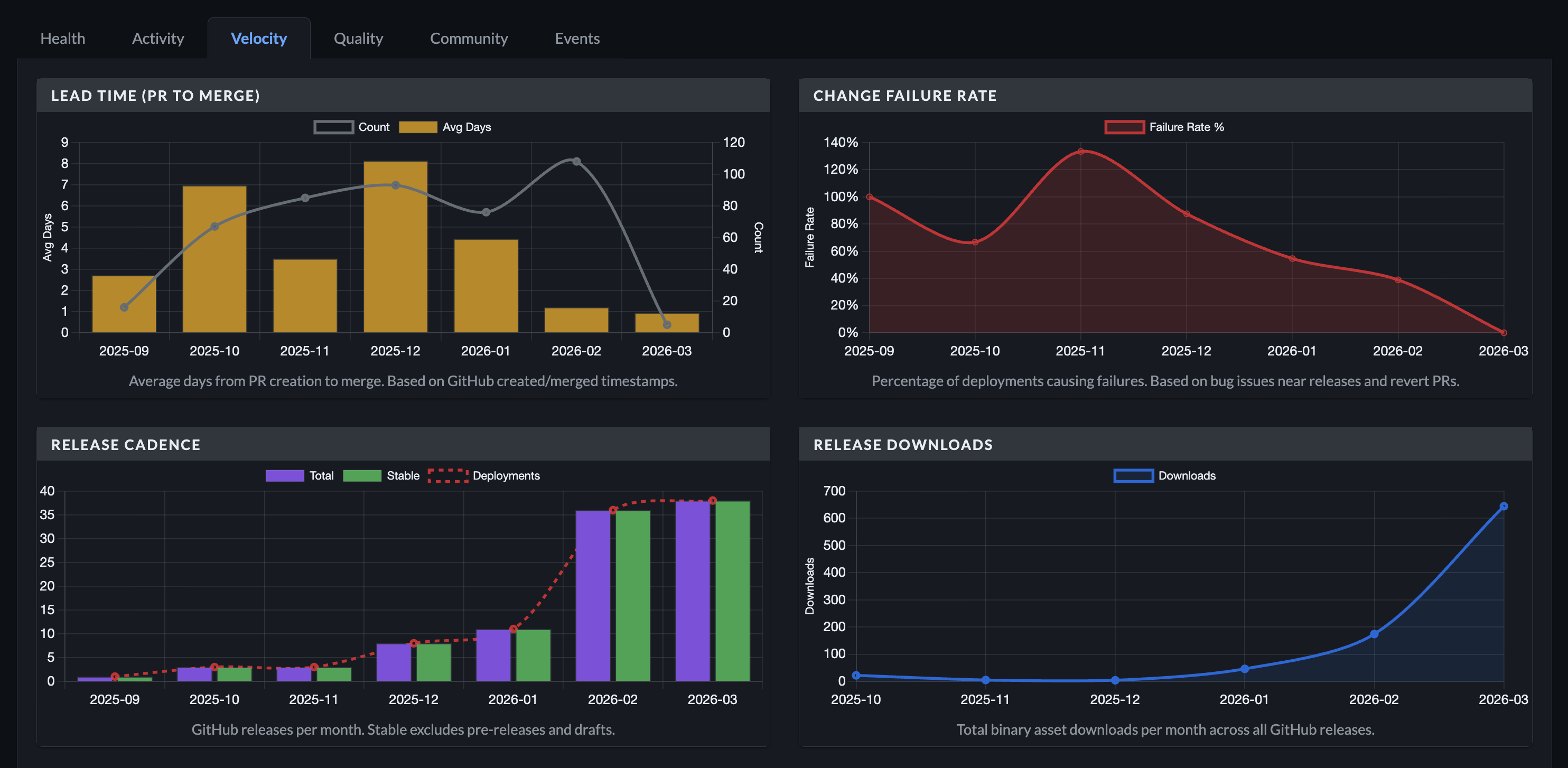
Velocity — Lead time from PR creation to merge, change failure rate, and release cadence. These are DORA metrics — the same signals that elite engineering teams track — computed automatically from your GitHub data. You also get release download counts and container image publication frequency if you publish to ghcr.io.
Quality — PR-to-review ratio shows whether code is being reviewed at the rate it’s being written. Review latency measures how long contributors wait for their first review. Time-to-close tracks issue responsiveness. Contributor reputation scoring surfaces identity confidence signals for people contributing to your project.
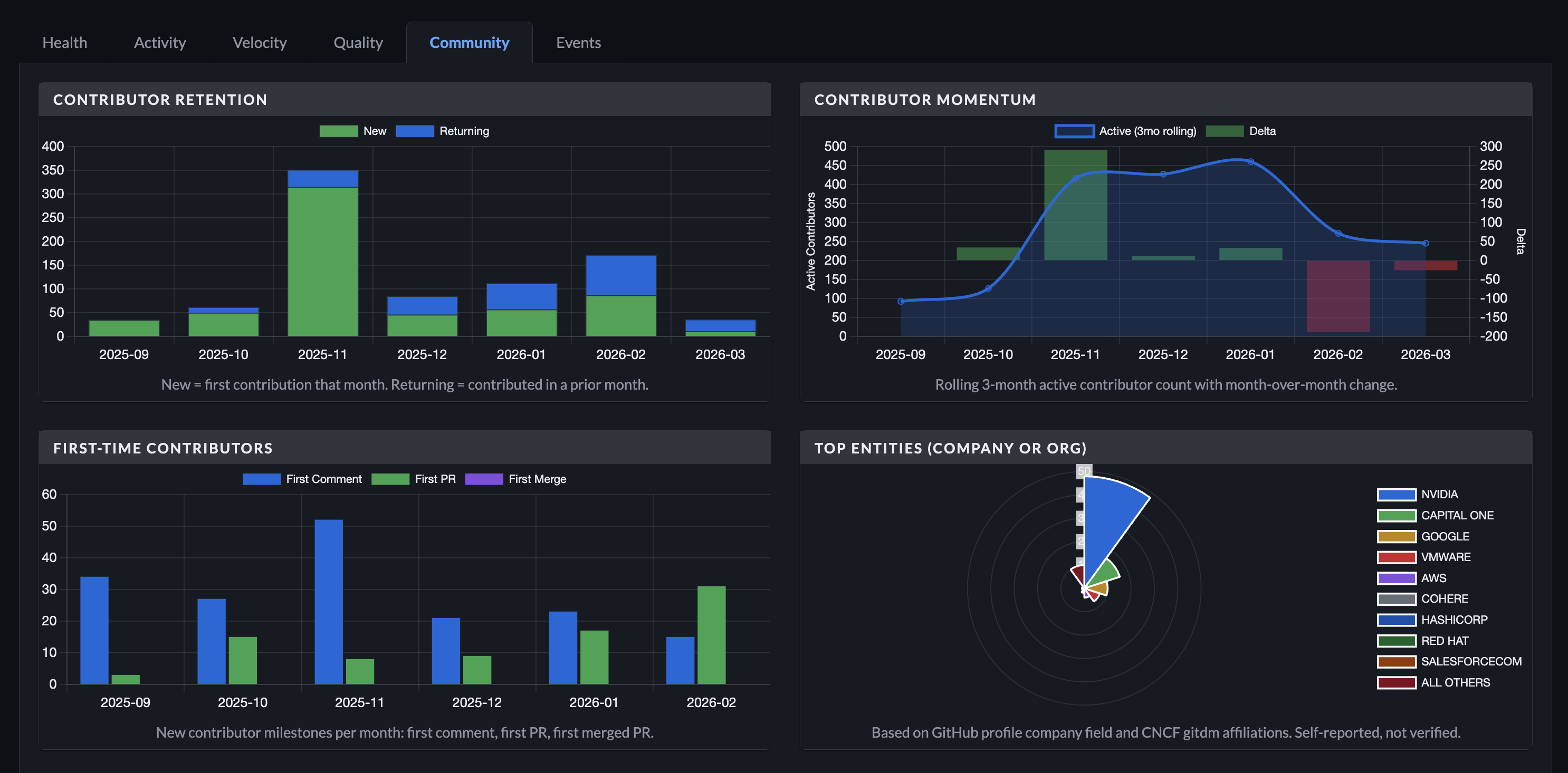
Community — New contributors versus returning contributors per month. A rolling three-month active contributor count with momentum indicators. First-time contributor milestones (first comment, first PR, first merged PR). Top contributing organizations and individuals. This is the tab that tells you whether your community is actually a community or just a mailing list.
Events — Searchable, filterable event log. Click any data point in the charts above and the Events tab populates with the underlying records, each linked back to GitHub.
Getting started
Install via Homebrew:
brew tap mchmarny/tap && brew install devpulse
Or download a binary from the releases page. Binaries are available for macOS, Linux, and Windows across amd64 and arm64. Every release is signed with Sigstore, ships with an SBOM, and includes GitHub build provenance attestations — so you can verify exactly what you’re running.
Then, three simple commands:
# Authenticate with GitHub (stores token in your OS keychain)
devpulse auth

# Import data for your project
devpulse import --org your-org --repo your-repo

# Start the dashboard
devpulse server
Your browser opens to http://127.0.0.1:8080 (port and auto-open configurable) with a full analytics dashboard. The whole process takes a few minutes depending on how much history you’re importing. By default, DevPulse pulls six months of data. Adjust with --months if you want more.
Your data, your machine
The default storage backend is SQLite. Your database lives at ~/.devpulse/data.db — a single file you can back up, move, or delete. The dashboard reads from this local database. No data leaves your machine once the initial GitHub API import is complete.
This matters if you maintain a project where contributor data is sensitive. Maybe you’re tracking contributions across a corporate open source portfolio and don’t want that mapping exported to a third party. Maybe you’re a solo maintainer and just don’t want another account to manage. Either way, the data stays where you put it.
Beyond the dashboard
The CLI isn’t just a launcher for the web UI. It’s a complete data management toolkit:
Query — Pull structured JSON from your local database. List developers, search events by type and date range, explore entity affiliations. Pipe the output to jq for scripting:
devpulse query events --org my-org --repo my-repo \
  --type pr --author username --since 2026-01-01
Score — Enrich contributor profiles with deep reputation signals from the GitHub API. Account age, organization membership, commit signing history, profile completeness, activity patterns:
devpulse score --org my-org --count 20
Substitute — Normalize messy entity data. GitHub profile company fields are free-text, so “Google”, “Google LLC”, “Google Inc.”, and “google” all show up as separate organizations. Fix that in one command:
devpulse substitute --type entity --old "Google LLC" --new "GOOGLE"
Sync — Automate imports on a schedule. Point it at a YAML config file listing your orgs and repos, and run it hourly via cron. DevPulse rotates through repos round-robin style to stay within GitHub API rate limits:
devpulse sync --config sync.yaml
Scaling up when you need to
SQLite works well for most use cases — a maintainer tracking a handful of repos, or a small team monitoring their project portfolio. But if you’re running DevPulse across a large organization with dozens of repos and thousands of contributors, you can switch to PostgreSQL:
devpulse import --org large-org --repo repo-1 \
  --db "postgres://user:pass@host:5432/devpulse"
The --db flag (or DEVPULSE_DB environment variable) accepts either a file path for SQLite or a postgres:// URI. Same CLI, same dashboard, same queries — just a different backend. This also opens the door to running DevPulse as a hosted service behind Cloud Run service or any container platform, with a managed database and scheduled sync jobs.
The point is that you start local and self-contained. If your needs grow, the path to a shared deployment is a flag change, not a rewrite.
Try it
DevPulse is open source under Apache 2.0. Install it, point it at your project, and see what the data says about your community. The questions it answers — who’s contributing, are we retaining people, how concentrated is our risk — are the ones that determine whether a project is sustainable. Having answers shouldn’t require an enterprise contract.